Wine Birthday Invitation: A Digital Animated Video Template
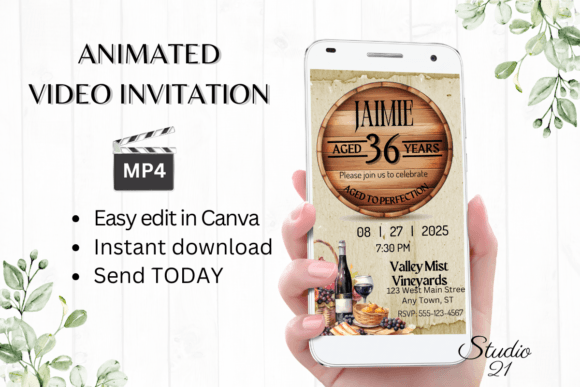
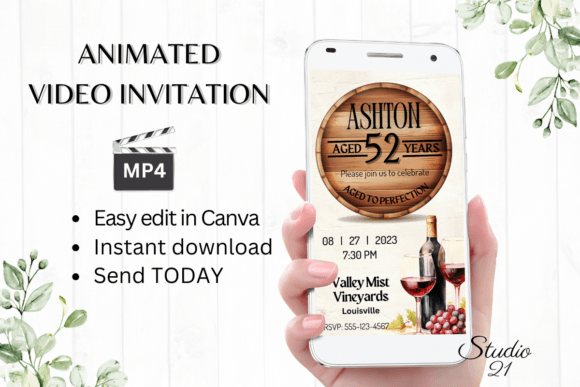
Planning a celebration for a wine lover? Forget the hassle of designing from scratch. The Wine Birthday Invitation template offers a sophisticated, ready-to-use solution for your next party. This isn't just a static image; it's a dynamic, animated video invitation that sets the perfect tone for an elegant evening. Crafted with a rich, vineyard-inspired aesthetic, it combines deep burgundy hues, elegant gold accents, and subtle animated elements like rising bubbles or a gentle pour. The overall personality is one of refined celebration—think boutique winery, not a casual bar. It feels personal, upscale, and inviting, immediately communicating to your guests that this will be a special occasion.
Where This Digital Invitation Template Shines
This template is incredibly versatile for anyone hosting a milestone birthday, wine tasting party, or sophisticated gathering. Its strength lies in its adaptability across various platforms and purposes. For social media graphics, you can download the final MP4 and post it as a story or reel to generate excitement. The animated format grabs attention far more effectively than a static post. For direct communication, it’s perfect for sharing via WhatsApp, Messenger, or iMessage, where the video plays automatically. You can also embed the downloadable link in an email marketing campaign or on a private event webpage. The template’s design ensures it looks polished whether viewed on a smartphone screen or a desktop monitor, making it a reliable asset for any digital-first invitation strategy.
Practical Guidance for Personalizing Your Evite
Getting started is straightforward. Upon purchase, you receive a PDF with a direct link to the Canva template. This means there's no software to download and no fonts to install. You can edit everything directly in your web browser or on Canva’s mobile app. The editing options are robust yet user-friendly. You can personalize all text—change names, dates, venues, and any custom messages. Don’t like the font? You can easily change the font style, color, and size to match your specific theme. The animation itself can be adjusted; perhaps you want a different transition or a slower pace. For those concerned about commercial licensing, the template is licensed for personal use, so you can use it for your event without worry. The key is to test your edits before finalizing. Preview the animation to ensure text is readable and all information is correct. The provided user guide and Canva instructions are invaluable for first-time users, walking you through each step of the customization process.
Maximizing Impact and Readability
A beautiful design is useless if the information isn’t clear. This template prioritizes readability through a strong visual hierarchy. Typically, the guest of honor’s name is the most prominent element, followed by the event details. The color palette—dark backgrounds with light, high-contrast text—ensures legibility. When you edit, maintain this hierarchy. Keep essential information (who, what, when, where) easy to scan in a few seconds. The animated format allows you to reveal information sequentially, which can actually improve engagement by guiding the viewer’s eye. Consider the overall brand perception of your event. The consistent use of wine-themed colors and elegant typography across the invitation sets a professional and cohesive tone, making your event feel meticulously planned from the very first impression.
Choosing and Using the Template Effectively
Before you dive in, evaluate if this template fits your event’s vibe. It’s ideal for a 21st, 30th, 40th, or 50th birthday with a wine, vineyard, or black-tie theme. If your party is more casual—like a backyard barbecue—it might not be the best fit. Once you’ve confirmed the fit, plan your edits. Gather all the necessary information: full name, date, time, venue address, RSVP details, and any dress code. Think about font pairing within the template. While the default fonts are chosen to complement each other, you might swap one for a more personal script font or a cleaner sans serif font to better reflect the guest of honor’s personality. Always do a final test run. Send the edited MP4 to yourself on different devices to check playback, clarity, and loading speed. This simple step ensures your digital invitation makes the polished, professional impression you intend, seamlessly blending modern convenience with timeless elegance.