Snow Globes Coloring Book Cover: Designing Your Winter Scene
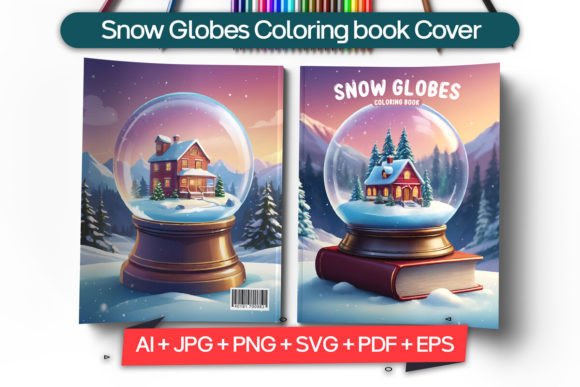
Capturing the serene, magical essence of a snow globe in a book cover design requires more than just placing a dome over a winter scene. It demands a specific visual language—one that balances intricate detail with a cozy, inviting atmosphere. For authors, writers, publishers, and cover designers, the Snow Globes Coloring Book Cover template offers a direct path to achieving that polished, professional look. It’s a design asset built for those who want full creative control without starting from a blank canvas, allowing you to focus on the story your cover tells.
The Anatomy of a Captivating Cover
At its core, this template provides a structured yet flexible foundation. The 8.5 x 11 inch format is a standard, widely accepted size for many coloring books and activity books, making it a practical choice. The visual design typically features a central snow globe as the focal point, surrounded by delicate, winter-themed elements like snowflakes, ribbons, or gentle typography. The personality of the cover leans towards whimsical, nostalgic, and detailed—perfect for engaging an audience that enjoys mindful, creative activities.
What makes this template particularly useful is its preparation for both digital and physical realms. With a resolution of 300 DPI and CMYK color mode, the files are print ready, ensuring your colors appear vibrant and accurate when sent to a printer. For digital publishing, the included PNG and JPG files at 300 PPI offer high-quality assets for online storefronts, social media promotions, and website banners. This dual readiness removes a significant technical hurdle for small business owners and self-publishing authors who need to move quickly from design to distribution.
Customization: Making the Design Uniquely Yours
The true value of a premium font and template system lies in its editability. This download includes layered Adobe Illustrator files, meaning every element—the globe, the background, the text—is on a separate, editable layer. You can adjust colors to match your brand identity, swap out graphics for different seasonal themes, or completely rework the typography to suit your book's tone. The included fonts are part of the package, a crucial detail that ensures design consistency and saves you from scrambling to locate or purchase matching typefaces later.
Consider the practical applications. A publisher could use this base to create a series of seasonal coloring books—winter, spring, summer, and fall—by simply modifying the central graphic and color palette. A content creator or blogger might adapt the cover design for a printable planner or a set of social media graphics, maintaining a cohesive visual theme across platforms. The vector-based SVG and EPS files are particularly valuable here, as they can be scaled infinitely without losing quality, whether you're designing a tiny thumbnail for Amazon or a large poster for a craft fair.
Strategic Font Choices and Brand Perception
Typography on a cover does more than display a title; it sets an expectation. The font pairing included with this template is chosen to complement the intricate, hand-drawn style of a coloring book cover. Often, such designs pair a clean, readable sans serif font for the title with a more decorative script font or handwritten font for subtitles or author names. This combination creates a clear visual hierarchy, guiding the viewer's eye from the main title to supporting text without confusion.
When evaluating the font's role in your project, think about readability first. A highly stylized display font might look beautiful on the cover but could be illegible at small sizes on a digital thumbnail. Test your design at various scales. For brand consistency, ensure the chosen typeface aligns with other materials you produce. If your author brand is clean and modern, you might opt for the sans serif elements. If it's more whimsical and personal, leaning into the script or handwritten styles could strengthen your brand identity.
Practical Guidance for Your Project
Before diving in, a few practical steps will streamline your process:
- Evaluate the Fit: Does the snow globe motif align with your book's content? For a holiday-themed coloring book, it's a natural fit. For a more general nature coloring book, you might replace the globe with a different central frame, like a wreath or a window scene.
- Test Font Pairings: While the included fonts are designed to work together, don't be afraid to experiment. Use the editable layers to try a different serif font for the title to see if it adds a more traditional or elegant feel. The goal is to find a combination that feels right for your specific audience.
- Review Commercial Licensing: This is a critical step for any commercial font or design asset. Ensure the license covers your intended use, whether it's for a print-on-demand book, a digital download, or merchandise. The included files are provided for this purpose, but always verify the terms.
- Leverage All File Formats: Don't just open the AI file and call it a day. Use the PDF for your printer, the PNG for your ebook cover, the SVG for scalable web graphics, and the JPG for quick social media posts. Each format is optimized for a specific use case.
Ultimately, this Snow Globes Coloring Book Cover template is more than a static image; it's a versatile toolkit. It empowers you to produce professional-looking design assets