ChatMate: Your AI Chatbot Website Landing Page Template
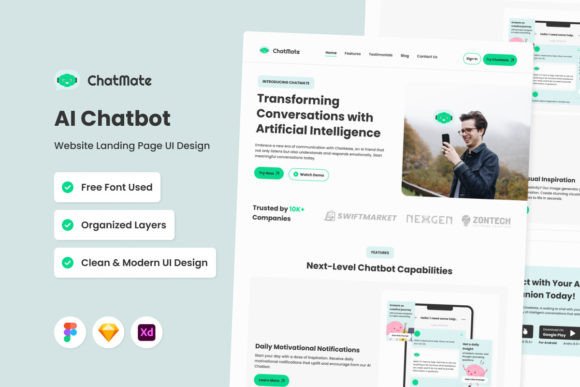
First impressions online are made in milliseconds. For a website, especially one built around a service or product, that initial moment decides whether a visitor stays to learn more or clicks away. The ChatMate - AI Chatbot Website Landing Page template is built with this reality in mind. It’s not just a collection of web pages; it’s a structured environment designed to immediately communicate value, guide user interaction, and present your AI chatbot service with clarity and modern appeal.
A Design Built for Conversation and Conversion
Visually, ChatMate presents a clean, contemporary aesthetic. The layout prioritizes open space, allowing your core message and the chatbot interface itself to breathe. Typography is handled with a focus on readability, using clean sans serif fonts that work reliably across devices. The color system is flexible, with global styles that make it simple to align the entire page with your existing brand palette. You’ll find the visual hierarchy intuitive—headlines, supporting text, feature highlights, and call-to-action buttons are positioned to guide the eye naturally down the page.
The personality of this template is professional yet approachable. It avoids overly playful or sterile extremes, striking a balance suitable for a wide range of businesses. Whether you're a startup showcasing an innovative tool or an established company integrating chat support, the design adapts to convey both innovation and trustworthiness. The interactive chat feature isn't just a mockup; it's a central, engaging element that demonstrates the product's functionality right on the landing page.
Where This Template Shines: Practical Applications
The strength of a template like ChatMate lies in its versatility across projects. For web designers and developers, it provides a robust, well-organized starting point. The layers are logically named and grouped, which drastically reduces the time needed to customize and launch. You're not wrestling with a tangled file; you're making strategic adjustments.
Entrepreneurs and small business owners will find it particularly valuable. If you're launching an AI-powered customer service tool, a SaaS product, or even a consultancy that uses chat for lead generation, this landing page gives you a professional online presence without the cost of a fully custom design from scratch. The mobile version is crucial here, as it ensures your message and functionality are seamless for users on smartphones—the primary browsing device for many.
For marketers and content creators, the template serves as an excellent case study in effective landing page structure. It demonstrates how to use visual elements to support a value proposition, how to structure information for skimmers, and how to place interactive elements strategically. You can use it as a direct tool for a campaign or as inspiration for your own design projects.
Making It Your Own: Guidance for Implementation
Choosing a template is the first step; effectively integrating it into your brand ecosystem is the real work. Here’s how to approach ChatMate with a practical mindset:
- Evaluate Fit: Before diving into edits, look at the template’s overall flow. Does the sequence of sections—hero, features, testimonials, chat demo, pricing, footer—align with how you want to tell your story? If your business relies heavily on social proof, you might need to expand the testimonials section. If it's all about the tech, the chat demonstration area might need more prominence.
- Customize with Purpose: Use the global text and color styles to your advantage. Changing the primary accent color to match your brand should update it across buttons, highlights, and icons consistently. Replace the open source fonts with your own brand typefaces, but test them thoroughly for on-screen readability. A beautiful display font for a headline might fail as body text at small sizes.
- Test the Pairings: The template likely uses a combination of a sans serif font for body text and another for headings. If you introduce your own premium font, ensure the pairing works. Does your chosen heading font create enough contrast without clashing? Is the line height and letter spacing still comfortable after your changes? Always preview on both desktop and mobile viewports.
- Leverage the Assets: The included free vector icons are design assets that save time. Ensure you use them in a style that matches your other branding materials. If your brand uses thicker, rounded icons, you might need to swap these out. The key is consistency across all your brand identity touchpoints, from this landing page to your social media graphics.
Remember, the goal isn't to use the template exactly as is. It's a framework. The well-organized layers and modern typography foundations are there to empower you to build something that feels uniquely yours, efficiently. By focusing on your specific audience's needs and testing every change for clarity and function, you can transform ChatMate from a generic landing page design into a powerful conversion tool that feels authentically connected to your business. The structured approach it offers is a practical solution to a common challenge: creating a high-quality, interactive web presence quickly and effectively.